


SimpliSafe Outdoor Camera is a great way to add security to your home or business. They are wireless and battery-powered, which makes the installation and maintenance easier. Simplisafe outdoor security system also have a variety of features that make them a great choice for security, including night vision, two-way audio, and motion detection.
If you have recently purchased one for your home, it’s essential that you learn about the setup and installation process. This will help you ensure that your Simplisafe camera is installed securely without issues.
In this article, we will discuss reasons you should choose these cameras, the impressive features, ways you can make the full use of your camera and some troubleshooting tips to help you through the tough times.
Why Choose SimpliSafe Outdoor Cameras?

Reasons to choose SimplySafe Outdoor Cameras are plenty. Below are some of them:
- Wireless and battery-powered: These cameras are easy to install and maintain. You can place them anywhere you need them. Moreover, you also don’t have to care about the wires running here and there.
- Night vision: Simplisafe has introduced night vision to its entire range of cameras, which helps you monitor your outdoors even in the dark.
- Two-way audio: The cameras from Simplisafe feature two-way audio which makes it easier for you to talk to visitors and guests at your door.
- Motion detection: Another important feature is the motion detection, so you can be alerted when someone is approaching your home or business.
Features of SimpliSafe Cameras
SimpliSafe Outdoor Cameras have a variety of features that make them a great choice for security. Here are just a few:
- 1080p HD video: Record in 1080p HD, so you can get a clear view of what’s happening.
- Night vision: Simplisafe cameras come with a night vision feature that helps you record and monitor your property during the night hours easily.
- Two-way audio: With the two-way communication feature, you can ensure easy communication with the visitors at your door, or people around your property.
- Motion detection: SimpliSafe Cameras have motion detection, so you can be alerted when someone is approaching your home or business.
- Weatherproof: SimplySafe Outdoor Cameras are weatherproof, meaning you can use them outdoors without having to worry about the rough weather conditions.
Simplisafe outdoor security system installation- Requirements
Before you begin with the Simplisafe outdoor security camera setup process, ensure that you have the following things:
- Your SimpliSafe Outdoor Camera
- A SimpliSafe Base Station
- A SimpliSafe Keypad
- A screwdriver
- A drill (optional)
- A 7/64" drill bit (optional)
- A USB adapter (optional)
- A 2.4GHz network connection
Tools Required for camera installation
The tools required for installation will vary depending on the mounting surface. For most surfaces, you will need a screwdriver and a drill. If you are mounting the camera on brick, stucco, or tile, you will also need a 7/64″ drill bit.
Step-by-Step Guide for SimpliSafe Outdoor Camera Setup
- First, download the SimpliSafe app to your smartphone or tablet.
- You will now need to create an account and add your SimpliSafe Base Station and Keypad to the app.
- Now, place the camera where you want to mount it.
- If you are mounting the camera on a wall, use the included screws to attach the mount to the wall.
- If you are mounting the camera on a ceiling, use the included screws to attach the mount to the ceiling.
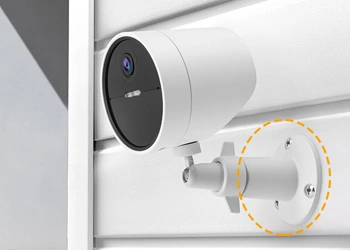
- Attach the camera to the mount.
- Connect the camera to the power source.
- Open the SimpliSafe app and follow the instructions to add the camera to your system.
How to install simplisafe camera with a solar panel?
If you want to install a solar panel with your SimpliSafe Camera, you will need to follow these steps:
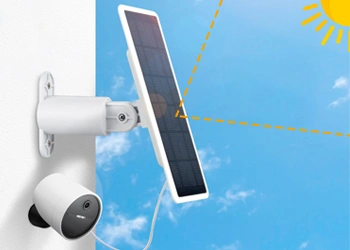
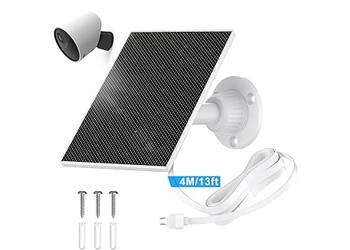
- You will need to purchase a SimpliSafe Solar Panel.
- Mount the solar panel in a location that receives direct sunlight.
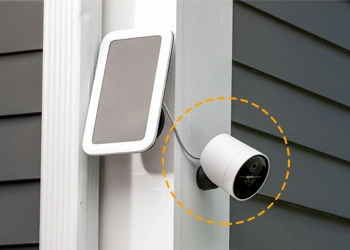
- Connect the solar panel to the camera using the included cable.
- You can now place your camera at the location where you want to mount it.
- Use the included screws to attach the mount to the wall or the ceiling as per your requirement.
- Now, attach the camera to the mount.
- Connect the camera to the power source.
Once connected, the camera power LED will light up indicating the connection to power source.
Troubleshooting Tips
If you are having trouble installing your SimpliSafe Outdoor Camera, here are a few troubleshooting tips:
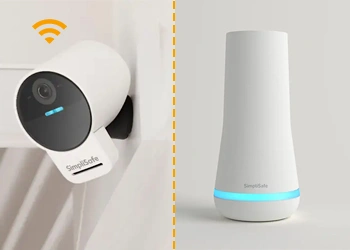
- Make sure that the camera is within range of your SimpliSafe Base Station. This will ensure that the wireless connection stays strong and you don’t face issues related to connectivity.
- Make sure that the camera is connected to the power source. If there is voltage fluctuation at your area, it is wise to use a voltage stabiliser.
- Make sure that the camera is properly mounted. Use the screws to install the camera securely in its place.
- Try restarting the simplisafe outdoor security system. Doing so can help resolve a lot of issues and prevent further complications from developing.
Additional Tips for Effective Outdoor Camera Installation
Here are a few additional tips for effective outdoor camera installation:
- Choose a mounting location that is well-lit and has a clear view of the area you want to monitor. This will ensure you don’t miss out on essential recordings.
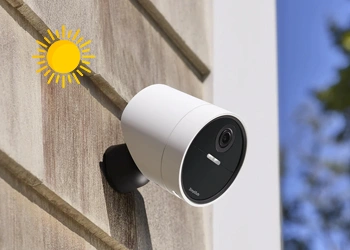
- Avoid mounting the camera in direct sunlight, as this can damage the camera over time. Though the camera is weatherproof, extended exposure to harsh weather conditions will have an effect on the camera’s functioning.
- If you are mounting the camera on a wall or a ceiling, make sure to use screws that are long enough to penetrate the wall and reach the framing.
- Once the camera is mounted, test it to make sure it is working properly.
FAQs
Can I install SimpliSafe outdoor cameras myself?
Yes, you can install SimpliSafe outdoor cameras yourself. The installation process is relatively simple and straightforward. However, if you are not comfortable installing the camera yourself, you can always hire a professional to do it for you.
Do SimpliSafe cameras work at night?
Yes, SimpliSafe cameras have night vision owing to the simplisafe outdoor sensors that they are equipped with. Using these, you can see what’s happening even in the dark. The night vision range is up to 30 feet. If the camera detects something it can alert you or you can also configure the camera to initiate the simplisafe outdoor alarm.
How to turn off simplisafe base station?
To turn off a Simplisafe Base Station, you will need to disarm the system using the app or the keypad. Once done, unplug the power cord and open the battery compartment using a screwdriver. Remove the backup battery from there to complete the power-down process. You can also turn off the status lights using the app or keypad in the System settings. This won’t require you to remove the battery.
How much does the simplisafe active guard outdoor protection cost?
The simplisafe active guard outdoor protection costs around $49.99 per month for overnight coverage and $79.99 for 24/7 coverage. This protection is part of the Pro or Pro Plus Monitoring plans and requires a compatible Simplisafe outdoor camera in addition to an added fee on top of the base monitoring.
How do Simplisafe outdoor gate sensors work?
The Simplisafe outdoor gate sensors work just like standard entry sensors. There are two magnetic parts including a sensor and a magnet which are placed on the gate and its frame with the magnet near the sensor. When the gate opens, the magnet moves away from the sensor breaking the magnetic field and this triggers a signal to the base station which in return sounds an alarm or alerts the monitoring center.
Have more questions on Simplisafe Outdoor Camera Setup?
Get Answers from our expert team, today!